Showing posts with label database. Show all posts

25 Aug 2010

Database vs ETL processing - a comparison

Source data

The POINT table/file holds 100 records similar to this. Point ranges from 1000 to 5000.

CustNo
Point
1054
2781
1055
3050
1056
3714
1057
3385
1058
3910
1059
3041
1060
3301
1061
4615
1062
4300
1063
5126

The CUSTOMER table/file holds 100 records similar to shown below.

CustNo
Name
Address
Town
Postcode
Sex
1054
Kirby Roman
390-4028 Vitae Avenue
Twin Falls
QO8 9DS
F
1055
Brianna Kaufman
Ap #414-8109 Nunc St.
Aberdeen
MD01 6PY
F
1056
Quon Maldonado
1214 Mi St.
Nevada City
EJ7 3BW
F
1057
Sarah Burke
897-4509 Integer Rd.
DuBois
J2 0ZW
F
1058
Alice Pickett
3730 Sed Street
Grambling
C6G 8YI
F
1059
Odette Richard
P.O. Box 920, 6838 Felis Av.
Oklahoma City
O5 0QM
F
1060
Ursa Nunez
310 Euismod Street
Pierre
P30 8FZ
F
1061
Caryn Walker
Ap #969-5153 Ipsum. Rd.
Idaho Falls
GF1 2VR
F
1062
Dai Lawrence
907-2556 Suspendisse Rd.
Pass Christian
B3R 2JV
F
1063
Claudia Calhoun
P.O. Box 932, 3401 Cras Avenue
Poughkeepsie
XU8 7LC
F

Requirement

1. Select only customers with points > 1000
2. Join with customer details on CustNo to populate customer details with points
3. Based on customer gender, create salutation field in output as Mr/Ms First name Surname
4. Create 3 feeds named Gold, Silver & Bronze based on following logic
• Gold - point > 4001
• Silver - point between 2001 and 4000
• Bronze - point between 1001 and 2000

All output feeds will have following fields:

CustNo
Salutation
Address
City PostCode
Point
Category (Gold/Silver/Bronze)

The output will look like this.

CustNo
Name
Address
Town Postcode
Point
Category
1073
Ms Cassidy Stokes
9679 Malesuada Ave
Sedalia BX4G 0HV
4120
Gold
1074
Ms Germane Olson
P.O. Box 631, 2307 Lobortis Road
Darlington N1H 3IM
5402
Gold
1044
Mr Emery Andrews
6721 Quis Av.
Needham X3Z 9SJ
3158
Silver
1045
Mr Leonard Logan
P.O. Box 554, 591 Massa. Road
Minnetonka LF3F 6ON
2569
Silver
1030
Mr Stewart Sanford
Ap #246-7429 Vitae Av.
Gadsden V26 6GZ
1522
Bronze

NB. There will actually be 3 output feeds - for gold, silver and bronze customers.

ETL Solution

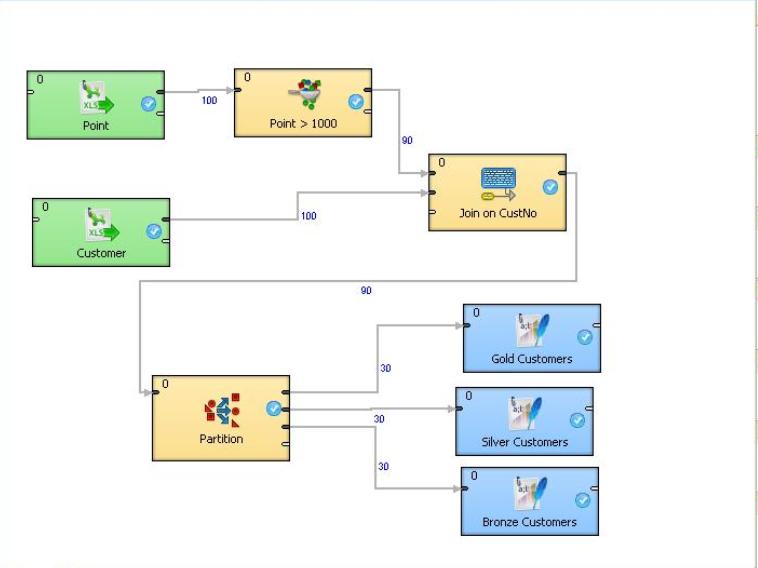
The Clover ETL solution will be like shown in next figure.


Database Solution

The solution shown here uses Oracle database.

There will be a table named PROCESS_FLOW which will control the overall flow as explained further.

The sample contents of this table will be like this for the particular example we are discussing here.


STEP
SOURCE_VIEW
TARGET_TABLE
ACTION
DESCRIPTION
10
CUSTOMER_FILTER
CUSTOMER_FILTER_TABLE
TRUNCATE INSERT
selecting customers with point > 1000
20
CUSTOMER_JOIN
CUSTOMER_JOIN_TABLE
TRUNCATE INSERT
join above step with customer on CustNo
30
CUSTOMER_GOLD
CUSTOMER_GOLD_TABLE
TRUNCATE INSERT
select category = "GOLD" from above output


CREATE OR REPLACE VIEW CUSTOMER_FILTER AS SELECT * FROM POINT WHERE POINT > 1000;
CREATE TABLE CUSTOMER_FILTER_TABLE AS SELECT * FROM CUSTOMER_FILTER WHERE 1=2;
INSERT INTO CUSTOMER_FILTER_TABLE SELECT * FROM CUSTOMER_FILTER;
COMMIT;

CREATE OR REPLACE VIEW CUSTOMER_JOIN AS
SELECT P.CUSTNO, C.CUSTNAME, C.ADDRESS, C.TOWN, C.POSTCODE, P.POINT, C.SEX
,CASE WHEN P.POINT > 4000 THEN 'GOLD' WHEN (P.POINT > 2000 AND P.POINT <= 4000) THEN 'SILVER' WHEN (P.POINT > 1000 AND P.POINT <= 2000) THEN 'BRONZE' END CATEGORY FROM CUSTOMER_FILTER_TABLE P JOIN CUSTOMER C ON P.CUSTNO = C.CUSTNO; INSERT INTO CUSTOMER_JOIN_TABLE SELECT CJ.CUSTNO, DECODE(SEX,'M','Mr','F','Ms','??') || ' ' || CJ.CUSTNAME , CJ.ADDRESS, CJ.TOWN || ' ' || CJ.POSTCODE , NULL,CJ.POINT, CJ.SEX,CJ.CATEGORY FROM CUSTOMER_JOIN CJ; COMMIT; SELECT * FROM CUSTOMER_JOIN_TABLE; -- POSTCODE WILL BE NULL AS WE COMBINED THAT WITH TOWN IN PREVIOUS FIELD CREATE OR REPLACE VIEW CUSTOMER_GOLD AS SELECT * FROM CUSTOMER_JOIN_TABLE WHERE CATEGORY = 'GOLD'; CREATE TABLE CUSTOMER_GOLD_TABLE AS SELECT * FROM CUSTOMER_GOLD WHERE 1=2; INSERT INTO CUSTOMER_GOLD_TABLE SELECT * FROM CUSTOMER_GOLD; COMMIT; SELECT * FROM CUSTOMER_GOLD; -- list of GOLD customers


So, we can see how involved database processing steps are!

Difference between DB & ETL processing

Topic
DB
ETL
Parallel processing
DB process is sequential.
ETL process is parallel.
Phasing
DB process each step in a different phase.
Independent ETL components may be in same phase.
I/O
DB process lands data in disk (= tables).
ETL process can run in pipeline manner, without landing data to disk thus reducing I/O.
Intuitiveness
DB process is not intuitive. It makes maintaining them very difficult.
ETL process is a diagram. Very easy to understand and modify.
Platform specific
DB process is DB specific.
ETL process is generic. Heterogeneous environments can implement ETL processes in similar fashion.
Debugging
Debugging in DB is very cumbersome.
Debugging on ETL is often visual - so easy to spot problem.

Conclusion

An ETL process is much easier to maintain than DB specific process.

30 Jun 2010

Types of Oracle joins

Just as a brush up of Oracle join understanding.

Suppose we are joining two tables in Oracle.

SELECT T1.X, T2.Y
FROM T1 JOIN T2 ON T1.X = T2.X

Assume, T1 is driving table (i.e. more rows than T2)

Nested Loop join
------------------

for each record in T1
find matching record in T2 where T1.X = T2.X
fetch that record into result set

Now if there is no index on column X in T2, Oracle will perform full table scan for each record in T1.

Hash join
---------

Oracle will load create an in-memory index (knowns as hash table) for T2 (i.e. smaller table)

It will still perform similar operation

for each record in T1
find matching record in T2 where T1.X = T2.X
fetch that record into result set

But even if there is no index on T2.X, Oracle will use the hash table which works similar to index!

Clearly this is suitable only when T2 is small otherwise [1] hash table may not fit in memory [2] creation of hash table may involve a long time (then we could have created the index on T2 in first place!)

Sorted Merge join
-------------------

If both tables are very big, hash join is not suitable due to memory/time requirement and nested loop will be slow or will result in full table scan.

The alternative way to speed up performance is to use sorted merge join.

In this case, both tables are sorted by Oracle (using temporary tablespace) by joining key (X in this case).

The advantage is, when joining two tables, Oracle just needs to scan only a small part of the table (e.g. as they are sorted, to find a record in T2 when T1.X = 15 will require Oracle search just from X=10 to X=20 in T2 as it cannot be beyond this range and so on).

The trade off is, it will take some resource (space/time/memory) to sort the tables.

Usually Oracle chooses best method of join based on statistics avaialble. However, user may force using a different type of join using hints like use_hash(T1,T2) etc.

2 Feb 2010

What is Dimension in Oracle data warehousing?

If you are using Oracle (10g upwards) database for data warehousing, chances are you might have come across DIMENSION in Oracle.
What is it and how does it help?

In data warehousing environment, often you find tables do not have referential integreties among them. While, I do not condone it, sometimes it is un-avoidable as source data comes from mainframe where, due to historic design, RDBMS like constraints could not be implemented.

So, when these data are loaded to Oracle tables (without any cleanup), implementing RDBMS constraints becomes difficult.

Without primary/foreign key relationships, Oracle optimizer will be confused as it won't know how to join different tables.

This is where Dimension comes to help!

Dimensions are simply logical constrains defined among tables. A product code may be logically related to transaction table which is defined by CREATE DIMENSION command.

What is the advantage? Well, it then behaves as if it knows foreign key relationships between tables (though not exactly the case).

The main performance gain is that it helps Oracle to rewrite queries so that it can either use a materialized view or avoid complex joins.

If you run a query which does something like this - show all possible aggregations from a very_large_table, it may take a very long time to complete.

Where as, if your DIMENSIONs are defined then Oracle may fetch same result by quering a smaller_table (which may be materialized view).

By defining Dimensions, you tell Oracle where else it may look for to satisfy your complex aggregation requirements.

There are some pre-requisites though, you must enable query rewrite enabled parameter to true beforehand.

20 Oct 2009

Oracle RAC - tiny intro

Introduction

An RAC database is a clustered database.

There are multiple Oracle instances which are connected via "interconnect" - which is a type of LAN.

The datafiles are stored in several disk drives which are connected by "cluster aware storage".

By adding multiple instances, we can add and remove and single Oracle instance without bringing the database down. So, database always remains available. That is the essence of RAC - high availability.

An RAC database is managed by "Oracle Clusterware". RAC operates in "shared everything" architecture mode.

Any storage (eg. SAN, SCSI etc.) can be used with RAC. However, good I/O speed is required for scalability of storage.

RAC supports up to 100 clusters which may be different at hardware level but must run same operating system!

Oracle recommends using ASM (Automatic Storage Management) for ease of dealing with clustered storage.

As a reminder, the RAC is used for high availability and scalability. When work load grows, you can simply add another server to the grid (RAC is a type of grid computing after all).

RAC can be managed via Oracle Enterprise Manager.

An Oracle RAC database requires three components - cluster nodes (the servers or computers running Oracle instances), shared storage (disk drives) and Oracle Clusterware (software application).

Installing RAC

The first step of working with RAC is to install "Oracle Clusterware" which is installed via Universal Installer.

Then you have to configure the clusterware.

Then install ASM (Automatic Storage Management)

Now install Oracle 11g database

Then perform post installation tasks. This ensures that clusterware and database are installed properly and they are aware of each other.

It is possible to convert your normal single instance Oracle database to an RAC database. You can achieve this via Enterprise Manager or "rconfig" utility.

Administering Clusterware

Oracle Clusterware includes two important components: the voting disk and the OCR.

The voting disk is a file that manages information about node membership, and the OCR is a file that manages cluster and Oracle RAC database configuration information.

RAC can be administered via Oracle Enterprise manager. On EM's web console mode, click on Availability tab to see details of Clusterware. You can click on Topology tab to see a visual represntation of your nodes. The Interconnect tab shows you info on interfaces. You can also add new instance to clusterware via EM (under Server tab).

Oracle Clusterware posts alert messages in alert log - which is under $CRS_home.

RAC data dictionary views are created by catclust.sql.

Cache Fusion

Oracle RAC uses "Cache Fusion" to synchronize the data stored in the buffer cache of each database instance.

Since all computers/instances in an RAC access the same database, the overall system must guarantee the coordination of data changes on different computers such that whenever a computer queries data it receives the current version - even if another computer recently modified that data. Oracle RAC refers to this functionality as Cache Fusion. It involves the ability of AC to "fuse" in-memory data cached physically separately on each computer into a single global cache.

Recommended Reference for further reading:

Oracle Database 2 day + RAC
http://download.oracle.com/docs/cd/B28359_01/rac.111/b28252.pdf

Converting single instance database to RAC

http://www.oracle.com/technology/pub/articles/chan_sing2rac_install.html

Other
http://www.orafaq.com/wiki/RAC_FAQ

8 Sept 2009

What is g in Oracle's grid computing?


Oracle defines Grid Computing like this -
With grid computing, groups of independent, modular hardware and software components can be connected and rejoined on demand to meet the changing needs of businesses.
What does it exactly mean?
We already know what is parallel computing. A complex task is dividided into smaller parts and each part is processed independently by a computer. Then the outputs are combined to get final result.
How does grid computing differ from this parallel computing?
Grid computing is an abstract (or virtualization, as Oracle says) concept. A grid can be an infrastructure grid, an appllication grid, an information grid and so on.
What - getting more confused? Ok, please read on.
In early days (~ 1980s) of database, the relational database management was starting to gain populartity. In RDBMS terms, a customer buys products and a transaction is generated. All these info like customer, product, transaction etc. are stored in RDBMS. They are linked together (by foreign keys, in 3rd normal form). So from a high level view, customer, product, transaction are all part of RDBMS.
Now come to the present days. We are gathering data like never before! Besides RDBMS, we now have lots of different stuffs like OLAP (Business Intelligence/Data Warehouse etc.), OLTP (transactional data), BPEL (Business Process Execution Language), Web services (using XML), OWB (Oracle Warehouse Builder) etc.
The grid is collection of all these - i.e. different applications and data which speak with one another.
Oracle has product of almost everything nowadays - which is wrapped around a buzzy name called Fusion Middleware. These components are designed so that one component (say OWB ) can interact with another (say core Oracle database). This constitute an architectural grid.
The relational data on your RDBMS can be termed as information grid.
There's another aspect of grid. Take Oracle Real Application Cluster or RAC. Here multiple instances of database are inter-connected to safeguard single point of failure. This is an example of infrastructure grid. Everything is part of grid. It is a concept. It could have been told as Matrix computing too. (Did you enjoy Matrix series of movies?)
Now you know what the buzzword Grid computing mean!

What is Oracle Fusion Middleware (OFM) and Service Oriented Architecture (SOA)?


If you are not sure about what are these things and try to have a look at Oracle's website, there is a good chance that you might find yourself confused.
That's quite expected. Oracle's website is for marketing their product. It's not their interest to describe their products in a way that people think it is there is no magic about it!
So, here I try to explain the things in non-geeky terms.
The Fusion Middleware conisists of Oracle's non core-database products - some of which are not actually middleware!
This includes Oracle's Developer suite (Forms & Reports), Java related tools, web logic server, content management etc. OFM depends on open standards such as BPEL, SOAP, XML and JMS.
Oracle SOA is a part of OFM.

What is SOA?

The main essence of SOA is that applications will talk with each other in a language (i.e. data format, process steps) which is understood by all others applications communicating with.
SOA is about reuse.
SOA helps business to move, change, partner and re-invent itself with ease and grace.
SOA extends idea of reuse not only to web services but also with business services.
SOA components are loosely coupled.
SOA can contain web service, BPEL etc.
Web service
Example, you throw a postcode to Yahoo Geocoder and it gives you back latitude, longitude of that post code.
You ask for price of particular item to a website, it suplies you the price.
Usually, web service results are returned in XML format to ensure universal compatibility.
In SOA segment, you will often hear the term "Orchestration". What does it mean?
If you seen an orchestra, you know that conductor just draws some invisible drawings in mid air by moving his magic wand from one side to another. However, musicians can decipher his rhythm and plays their instruments so that every one plays same tune at same pace.
Orchestration in SOA has similar meaning. It ensures that all applications under SOA, know how to be in sync with other applications in the group.
But how orchestration is implemented?
It is done via BPEL or Business Process Execution Language.
BPEL is a tool, using which you can draw how data moves from one application to another. For those who have not used it, it is like a Visio flow chart diagram editor. But, when you draw objects in BPEL, you tell them what to do. You instruct them where to read data from, how to process it and where to send output after processing finished. So, basically it is a graphical tool to define business process. Without BPEL, the whole process will look like thousands of lines of PL/SQL (or Java or C++ or whatever) codes!
Behind the scene BPEL still writes codes - but it just make simpler (!) for any business user to understand and define the process. Now whether that is good or bad is debatable - I am just outlining the concept here.
So, BPEL works to integrate several applications. BPEL usually follows XML standard as interface to several components.
Let us take a bigger example. Your supplies sends you a file which contains all the products, quantities and unit price you ordered for. You need to update your inventory accordingly. Now assume that your supplier quoted the price in € but you need to put that in £ in your database. Using absolute minium technology, you need to write a small program to convert € to £ while loading that data to your system. But if you are using BPEL, you can visually draw the program!

16 Apr 2009

Cost of databases


Money moves the world!

Ultimately your choice of database will depend on cost benefit analysis. The vendors intentionally make pricing model very complex (you might need help of your lawyer to understand it – seriously).

Customers rarely pay list price of software nowadays. So, this chapter is to give you some ballpark figures only as guide.

Since, most vendors are USA based, prices are given in $.

Vendor
Product
$ per CPU
$ per user
Support per year $
Oracle
11g Enterprise
40,000
800
10,000
Oracle
11g Standard
17,000
350
4,000
Microsoft
SQL Server 2008 Enterprise
25,000
?
?
Microsoft
SQL Server 2008 Standard
6,000
?
?
Sybase
IQ 12
70,000
?
15,000
Sybase
ASE 15 Enterprise
70,000
?
15,000
IBM
DB2 9.5
35,000
?
7,500
MySQL
Enterprise Platinum
Free to install
N/A
3,000
per server support

As you can see yourself, SQL Server is cheapest and serves requirement of small to medium organizations very well. Oracle is cheap compared to its features against other databases like Sybase. That’s why Oracle is most popular among large organizations.

Although I mentioned earlier that Sybase IQ, being column based database, is better for large data warehouses, but it doesn’t make sense to justify its cost unless your DWH database size in terabyte level.

31 Mar 2009

Row versus Column oriented databases


We illustrate this with an example. Consider following table.
ID
FIRST_NAME
LAST_NAME
SALARY
MGR _ID
DEPT_ID
100
Steven
King
24000

90
101
Neena
Kochhar
17000
100
90
102
Lex
De Haan
17000
100
90
103
Alexander
Hunold
9000
102
60
104
Bruce
Ernst
6000
103
60
105
David
Austin
4800
103
60
106
Valli
Pataballa
4800
103
60
107
Diana
Lorentz
4200
103
60
108
Nancy
Greenberg
12000
101
100
109
Daniel
Faviet
9000
108
100
110
John
Chen
8200
108
100

In a row based database, the data is stored in disk in row-wise fashion like shown below.

100|Steven|King|24000||90101|Neena|Kochhar|17000|100|90
102|Lex|De Haan|17000|100|90103|Alexander|Hunold|9000|102|60
104|Bruce|Ernst|6000|103|60105|David|Austin|4800|103|60
106|Valli|Pataballa|4800|103|60107|Diana|Lorentz|4200|103|60
108|Nancy|Greenberg|12000|101|100109|Daniel|Faviet|9000|108|
100110|John|Chen|8200|108|100

I have just colored each row in alternating color for easier visualization. I used “|” as value separator just for the sake of understanding.

As you can see, values for each row are stored together on disk. When a new row is added, it is just appended at the end of existing disk blocks (as shown by this color in above example)

Most databases are row based. These are – Oracle, SQL Server, Sybase ASE, Access etc.

Next we see how same data will be stored in column oriented databases.

This will be like this.

100|101|102|103|104|105|106|107|108|109|110Steven|Neena|Lex|
Alexander|Bruce|David|Valli|Diana|Nancy|Daniel|JohnKing|Kochhar|De Haan|Hunold|Ernst|Austin|Pataballa|Lorentz|Greenberg|Faviet|Chen
24000|17000|17000|9000|6000|4800|4800|4200|12000|9000|8200
|100|100|102|103|103|103|103|101|108|10890|90|90|60|60|60|60|60|100|100|100

Yes, you are right. Here all column values are stored together. Seems odd, isn’t it?
Whether it is weird or not, depends on the context.

Suppose you want to query the sum of salaries for the above table. How a row based database (say Oracle) will do it?

It will read entire first row and then will take the “24000” into its memory and will discard rest of column values for this row. Then it will to the same for 2nd, 3rd, 4th and nth rows. After that it will add all values to get the sum of salaries.
So, it will actually scan the full table. When we have few thousands (or even few millions) the result will appear almost instantly and you will hardly notice any performance issue.

The same query, when performed in a column based database (say Sybase IQ), it will read all the salary values
24000|17000|17000|9000|6000|4800|4800|4200|12000|9000|8200 in a single seek of the column! Clearly number of I/O operations is far less compared to row based database.
But on other hand, adding new row means all existing values need to move little bit to make spaces for new row (as shown by this color above).

Some notable column oriented databases are Sybase IQ, Vertica, C-store etc. Although Sybase IQ stores user data column wise fashion, its own data dictionaries are stored in Sybase ASE (within IQ product) which is a row wise database!

Column storage has another advantage. Since data in columns are of similar type, an efficient compression algorithm can be applied. As a result, often column based storage takes same or less space than raw data!
So what’s the moral of the story?
Row based databases are better where:
· Online Transaction Processing (OLTP) where lots of insert, update, deletes are happening.
· Where only a subset of data such as all or few columns of some rows (i.e. not all values of a column) only is accessed regularly.
· When all row values are supplied at the same time (i.e. adding a new record)
Column based database have upper hand where:
· Data warehouse and Decision Support System (DSS) where aggregates need to be computed over many rows but only for a notably smaller subset of all columns of data (because reading that smaller subset of data can be faster than reading all data).
· When all column values are supplied at same time – like adding a new column in a table.
Column based database will perform very poorly if rows are frequently inserted/deleted/updated!

So, in a nutshell, row oriented databases are best for OLTP systems and column based ones are for very large OLAP/DS systems. For small or medium DWH, a row based database with proper tuning will perform at par with column based storage.

In DWH environment, because of their inherent design, column based databases will perform 10 to 50 times faster depending on circumstances. I had to underline the “depending on circumstances” clause as it is only apparent when querying millions and billions or records from DWH fact table.

The fundamental reason using a column based database is to reduce disk “seek time”.
Horses for courses, that’s the bottom line.

Disclaimer:
It is important to recognize that modern databases are not so simply column-oriented or row-oriented as in the simple example above, since partitioning, indexing, caching, materializing views, OLAP cubes, and transactional systems such as write ahead logging or multi-version concurrency control all dramatically affect physical organization of DBMS data.